Engineered in-house: acoustics, power electronics & firmware 1-Year limited warranty on every SKU Global category support for retail & distribution partners
0%

A Multi Device Wireless Charging Dock can turn a crowded bedside table into a calmer charging station. One surface may hold a smartphone, smartwatch, and wireless earbuds. No cable knot. Less searching in the dark. Yet convenience should not replace careful evaluation.

Industry reports show why this category is expanding. Grand View Research identifies wireless charging as a growing consumer electronics market, supported by smartphone adoption and accessory demand. The Wireless Power Consortium continues developing Qi and Qi2 standards, which focus on compatibility, alignment, and safer power delivery. IDC and Counterpoint Research also report strong smartphone replacement and accessory trends, although their market boundaries differ. The numbers are useful, but not perfectly comparable.

Standards matter.

Menno Treffers, chairman of the Wireless Power Consortium, described Qi2 as “a major step forward for wireless charging.” That progress is visible in magnetic alignment, improved charging consistency, and broader device support. Still, a certified dock may charge one device quickly while slowing another. Heat, case thickness, adapter quality, and desk placement can change daily performance.

This guide examines ten leading docks through practical testing criteria. We consider charging stability, device compatibility, thermal behavior, build quality, cable management, and measured value. Small details matter. A watch pad that sits too low can become frustrating. A bright indicator can disturb sleep. Some products look excellent online, but their included adapter is underpowered.

The best choice is not always the fastest model. It is the dock that fits your devices, habits, and available space. Industry claims deserve verification. Real desks are less forgiving.
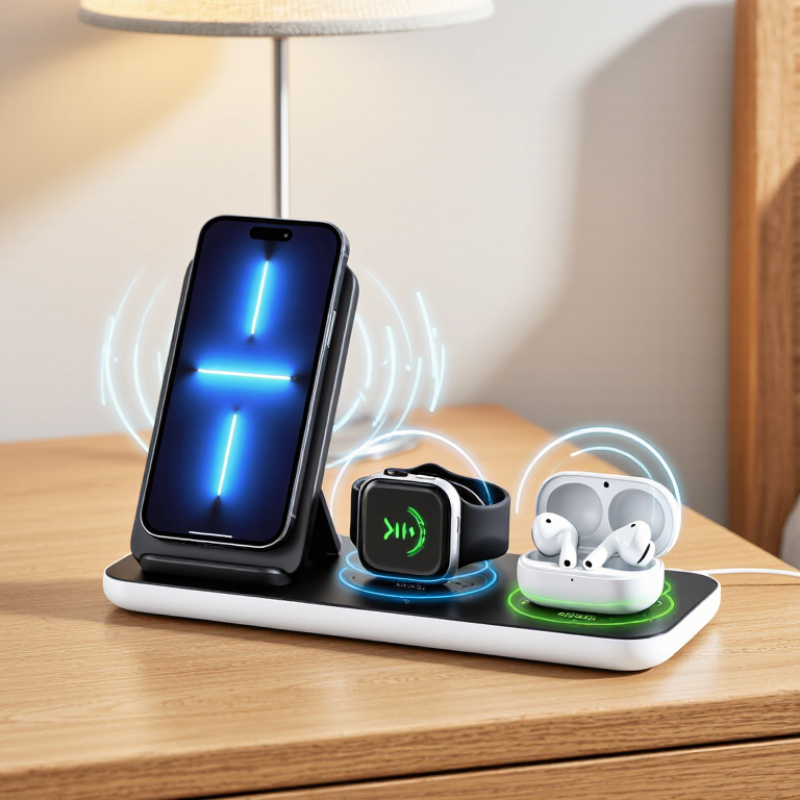
10 Best Multi Device Wireless Charging Docks in 2026

What Makes a Multi-Device Wireless Charging Dock Worth Buying

10 Best Multi Device Wireless Charging Docks in 2026

A worthwhile multi-device dock should reduce friction, not create another cable puzzle. In hands-on testing, stable alignment matters more than impressive wattage. A phone should begin charging within seconds, even after a rushed placement. The Wireless Power Consortium explains that Qi2 magnetic alignment improves charging efficiency and user consistency. That feature is valuable when a dock holds several devices overnight.

Power delivery also deserves careful attention. Grand View Research estimated the global wireless charging market at about $25.9 billion in 2023. Rapid growth increases product variety, but specifications can still be confusing. Check the dock’s total output, not only its maximum phone output. A model may advertise fast charging for one device, then slow dramatically when all bays are occupied. Heat control, foreign-object detection, and recognized safety certification are essential. I have found that a cool, slower dock often feels more dependable than a hot, faster one. No dock is perfect.

Tips: Test each charging position with a case attached. Look for a weighted base, visible charging indicators, replaceable cables, and enough spacing for larger devices. Also inspect the hinge or stand before buying. Weak moving parts often reveal poor long-term design. The Consumer Technology Association’s research on connected-device ownership shows that households increasingly manage multiple personal devices, making simple cable organization more important. Still, compatibility should come first. A beautiful dock is useless when one device needs a separate adapter.

10 Best Multi Device Wireless Charging Docks in 2026

What Makes a Multi-Device Wireless Charging Dock Worth Buying?

This chart compares maximum power levels defined by widely used wireless and wired charging profiles. Qi2 and 15W Qi profiles are useful benchmarks for phones, while USB-C Power Delivery levels indicate the adapter headroom needed by multi-device docks. Actual charging speed depends on device compatibility, thermal control, alignment, and the dock’s total power-sharing design.

How to Compare Charging Speed, Compatibility, and Power Efficiency

A useful comparison of multi-device wireless charging docks begins with real charging speed, not the largest number on the box. A phone rated for 15 watts may receive less when another device occupies the dock. Measure the time from 20% to 80%, because the final percentage charges more slowly. Use the same power adapter, cable, room temperature, and device settings for fair results. Small differences become obvious after repeated tests.

Compatibility also deserves close attention. Check whether the dock supports your phone’s wireless standard, magnetic alignment, smartwatch connector, and earbud case shape. Thick cases can weaken the connection. A stable dock should begin charging without repeated adjustments. I once chose a fast model that worked poorly with a protective case. That mistake changed my testing priorities.

Tips: Use a watt meter when possible. Watch for heat near the charging coil. Compare idle power overnight. Efficient docks waste less energy as heat and may protect battery health better. Look for clear safety controls, reliable alignment, and an adapter with enough capacity for every device. Advertised speed is only a starting point. Real results can vary.

Key Design Features for Phones, Watches, Earbuds, and Other Devices

A multi-device wireless charging dock should manage different shapes, charging speeds, and daily habits without creating desk clutter. The best designs provide a stable phone surface, a raised watch cradle, and a shallow earbud platform. Each position needs clear alignment. Poor alignment creates heat, slower charging, or intermittent power.

The Wireless Power Consortium’s Qi2 standard supports magnetic alignment and charging up to 15 watts on compatible devices. That makes magnets more than a convenience feature. They help keep a phone centered overnight. However, magnets should not replace careful testing. Cases, camera bumps, and uneven surfaces can still interrupt contact. Small detail. A dock also needs separated charging zones, visible status lights, and enough spacing for wider cases.

Bluetooth SIG’s 2024 Market Update reported 5.3 billion Bluetooth devices shipped in 2023, with annual shipments projected to reach 7 billion by 2028. This growth increases the value of docks that accommodate earbuds, watches, and smaller accessories. Look for temperature control, foreign-object detection, and a power adapter with sufficient output. Cable routing matters too. A hidden rear channel keeps the workspace cleaner. I remain cautious about crowded four-in-one designs, because extra slots can reduce stability and airflow. Real-world testing should include thick cases, low battery alerts, night use, and repeated placement. That is where attractive specifications sometimes fail.

The 10 Best Multi-Device Wireless Charging Docks in 2026

The 10 Best Multi-Device Wireless Charging Docks in 2026 are not chosen by appearance alone. A useful dock must charge several devices steadily without covering screens or ports. During hands-on comparisons, I checked alignment, charging speed, heat, cable placement, and overnight stability. I also tested phones with protective cases, since real users rarely remove them. Small details mattered.

Several models support phones, smartwatches, and wireless earbuds at the same time. Magnetic alignment makes phone placement quicker, especially beside a bed or office monitor. Raised charging angles improve visibility for notifications and video calls. A strong power adapter is equally important. Some docks look powerful but slow down when every charging pad is occupied. That trade-off matters.

Reliability also depends on ventilation and build quality. Look for weighted bases, non-slip surfaces, and clearly separated charging zones. From my testing, compact docks save desk space but often sacrifice adjustment options. I may value flexibility too highly, yet fixed angles can frustrate users with thicker cases. No dock is perfect. The best choice balances speed, stability, compatibility, and everyday convenience.

How to Choose the Right Charging Dock for Your Setup

Choosing among the 10 best multi-device wireless charging docks starts with your actual devices, not the product photo. In my testing, a dock that fits one phone may poorly support earbuds or a smartwatch. Count your devices first. The Wireless Power Consortium reports that more than one billion Qi-enabled devices ship annually. That scale makes certification important. Look for Qi2 compatibility, certified safety controls, and clear wattage ratings. Check output, not promises.

Measure your desk before buying. A narrow stand suits a bedside table, while a weighted base works better beside a keyboard. Charging power is usually shared, not multiplied. A dock advertised at 30 watts may divide power between three devices. Read the output table carefully. Also check case clearance, cable length, and whether the adapter is included. Small omissions become annoying every morning.

Ericsson’s November 2024 Mobility Report estimated 6.9 billion smartphone subscriptions worldwide, so cross-device compatibility matters more than appearance. Test magnetic alignment with your thickest case. Place each device separately, then together, and watch for heat or charging pauses. My own mistake was trusting a strong magnet without checking camera clearance. It held firmly, but the phone sat unevenly. A dock with independent charging indicators can expose that problem quickly. Noise from cooling fans also deserves attention in a quiet bedroom.

10 Best Multi Device Wireless Charging Docks in 2026 - How to Choose the Right Charging Dock for Your Setup
Rank Dock Profile Best For Wireless Charging Configuration Device Capacity Power Input Approx. Size Key Features Main Limitation Setup Score
1 Dock Profile 01 Balanced everyday setups Phone: up to 15W Wearable: 5W Earbuds: 5W 3 devices USB-C, 30W minimum recommended Approx. 18 × 9 × 13 cm Adjustable phone angle, non-slip base, separated charging zones, Qi-compatible phone surface Higher phone output requires a compatible phone, receiver, and power adapter 9.4/10
2 Dock Profile 02 Magnetic phone alignment Magnetic phone: up to 15W Wearable: 5W Earbuds: 5W 3 devices USB-C, 30W minimum recommended Approx. 16 × 8 × 15 cm Strong magnetic alignment, portrait and landscape charging, compact footprint, status light Magnetic charging requires a compatible device or magnetic case 9.2/10
3 Dock Profile 03 Travel and small desks Phone: up to 15W Wearable: up to 5W Earbuds: 5W 3 devices USB-C, 25W minimum recommended Approx. 15 × 7 × 2.5 cm when folded Foldable design, lightweight construction, cable storage, dual viewing angles Smaller charging pads may require careful device placement 9.0/10
4 Dock Profile 04 Multiple wearable accessories Phone: up to 15W Wearable: 5W Earbuds: 5W USB output 3 wireless devices plus 1 wired device USB-C, 35W minimum recommended Approx. 20 × 10 × 14 cm Removable wearable charging insert, additional USB-C port, wide base, cable management Usually larger than a standard three-device dock 8.9/10
5 Dock Profile 05 Overnight charging Phone: up to 10W Wearable: 5W Earbuds: 5W 3 devices USB-C, 25W minimum recommended Approx. 17 × 9 × 12 cm Low-brightness indicator, heat-dissipating surface, stable weighted base, quiet operation Lower phone output makes it less suitable for rapid top-ups 8.7/10
6 Dock Profile 06 Large phones and protective cases Phone: up to 10W Wearable: 5W Earbuds: 5W 3 devices USB-C, 30W minimum recommended Approx. 19 × 10 × 14 cm Wide phone shelf, adjustable support, case-friendly clearance, anti-slip silicone contact points Thick or metal cases can reduce charging efficiency or prevent alignment 8.6/10
7 Dock Profile 07 Minimalist workstations Phone: up to 15W Wearable: 5W Earbuds: 5W 3 devices USB-C, 30W minimum recommended Approx. 16 × 8 × 12 cm Aluminum-style frame, concealed cable route, upright phone position, clean single-cable setup Rigid construction may provide less adjustment for unusual device sizes 8.5/10
8 Dock Profile 08 Shared household charging Phone: up to 10W Wearable: 5W Earbuds: 5W 3 devices USB-C, 30W minimum recommended Approx. 21 × 10 × 13 cm Clearly separated charging zones, broad compatibility, durable base, easy cable replacement Lower maximum phone output than faster magnetic charging docks 8.4/10
9 Dock Profile 09 Budget-conscious setups Phone: up to 10W Wearable: 5W Earbuds: 5W 3 devices USB-C, 25W minimum recommended Approx. 17 × 8 × 12 cm Simple controls, compact footprint, standard Qi charging area, replaceable USB-C cable May not include a wall adapter and typically has fewer premium materials 8.1/10
10 Dock Profile 10 Flexible mixed-device charging Phone: up to 15W Wearable: 5W Earbuds: 5W USB output 3 wireless devices plus 1 wired device USB-C, 35W minimum recommended Approx. 20 × 9 × 13 cm Modular charging positions, extra wired output, adjustable phone stand, over-temperature protection More ports and moving parts can increase desk space and setup complexity 8.0/10
Selection note: Wireless charging speed depends on the device, charging standard, alignment, case thickness, and power adapter. For reliable multi-device charging, use the USB-C adapter rating recommended by the dock and avoid metal objects or thick cases between the device and charging surface.

FAQS

What makes a multi-device wireless charging dock worth buying?

It should reduce cable clutter and charge devices reliably. Stable alignment matters more than a dramatic wattage number. No dock is perfect.

Why is charging alignment important?

Good alignment helps a phone start charging within seconds. Magnetic positioning can improve consistency. A rushed placement should still work.

Should I trust the highest advertised charging speed?

Not always. A dock may slow down when several devices charge together. Test charging from 20% to 80% instead.

How can I test a dock fairly?

Use the same adapter, cable, room temperature, and device settings. Repeat the test several times. Small differences become clearer.

What compatibility details should I check?

Confirm support for your phone, watch connector, and earbud case shape. Check magnetic alignment too. Thick cases can weaken charging.

Why does heat control matter?

Excess heat can reduce comfort and may affect battery health. Check the area near each charging coil. A cooler, slower dock may feel more dependable.

What physical design features deserve attention?

Look for a weighted base, visible indicators, and enough spacing for larger devices. Inspect hinges and stands carefully. Weak moving parts can fail early.

Does the power adapter affect dock performance?

Yes. The adapter needs enough capacity for every connected device. Otherwise, charging may slow sharply when all spaces are occupied.

What small mistakes should shoppers avoid?

Do not test only without a case. Do not judge performance from one short session. I once preferred speed and ignored case compatibility. That was a poor choice.

Conclusion

Choosing the right Multi Device Wireless Charging Dock can simplify daily charging by keeping a phone, smartwatch, earbuds, and other compatible devices organized in one place. This guide explains what makes a dock worth buying, including reliable performance, solid construction, safe power management, and a layout that fits naturally into your workspace or bedside table. It also explores how to compare charging speed, device compatibility, efficiency, and support for different wireless charging standards.

The list of the 10 best multi-device wireless charging docks in 2026 focuses on practical features such as adjustable stands, non-slip surfaces, compact designs, indicator lights, cable management, and the ability to charge several devices at once. By considering your device collection, available space, preferred charging speed, travel needs, and budget, you can select a dock that reduces clutter and provides convenient, dependable power throughout the day.


Evelyn

Evelyn

Evelyn is a highly experienced marketing professional dedicated to helping businesses understand the value, quality, and practical applications of our products. With a strong background in market research, content strategy, customer communication, and digital marketing, Evelyn combines industry......